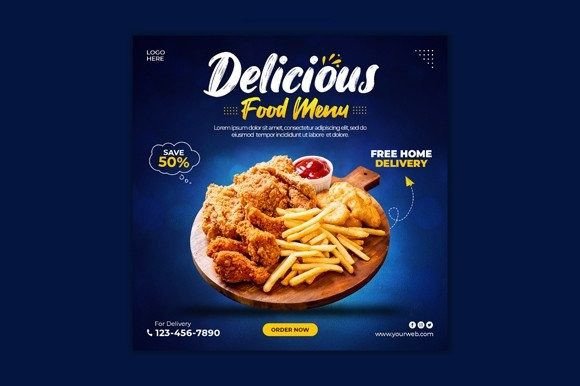
Food Social Media Post Banner Guide
In the crowded digital landscape of culinary content, visual appeal is not just an advantage; it is a necessity. Whether you are running a local bakery, managing a food blog, or promoting a new restaurant menu, the first thing your audience notices is the image. A Food Social Media Post Banner serves as the digital storefront for your culinary creations. It is the hook that stops the scroll and invites the viewer to engage with your brand. However, creating high-quality graphics from scratch can be time-consuming and technically demanding. This is where a clean, modern, and fully customizable template becomes an invaluable asset for professionals and creators alike.
The Strategic Value of Consistent Visuals
Consistency builds trust. When a user scrolls through their feed, they subconsciously recognize brands that maintain a cohesive aesthetic. A well-designed Food Social Media Post Banner ensures that every post aligns with your brand identity, whether that is rustic and warm or sleek and minimalist. By using a standardized template, you eliminate the guesswork involved in layout design. You no longer need to worry about font pairing, color balance, or whitespace distribution for every single post. Instead, you can focus on what matters most: the quality of the food and the message you wish to convey.
For entrepreneurs and small business owners, time is a scarce resource. Spending hours adjusting layers in graphic design software for a single Instagram post is rarely an efficient use of time. A pre-designed template allows you to swap out images and text in minutes. This efficiency means you can maintain a consistent posting schedule without burning out. The ability to produce professional-grade content quickly supports a more agile marketing strategy, allowing you to react to trends, seasonal menus, or daily specials with ease.
Understanding the Template Features
To maximize the utility of a design asset, it is essential to understand its technical specifications. The template in question is provided as a fully layered PSD file, which offers maximum flexibility for users familiar with Adobe Photoshop. The dimensions are set to 1080 px x 1080 px, the standard square format optimized for Instagram and Facebook feeds. This ensures that your images appear crisp and clear on both mobile devices and desktop screens.
One of the most powerful features of this template is the use of Smart Objects. For those unfamiliar with this term, Smart Objects allow you to replace the placeholder image with your own photo without losing the original formatting, shadows, or effects applied by the designer. You simply double-click the layer, paste your food photography, save, and the template updates automatically. This feature preserves the professional look of the design while making it incredibly easy to customize. Additionally, the template operates in RGB Color Mode, which is the standard for digital displays, ensuring that the colors of your food look vibrant and true to life on screens.
Another significant benefit is the use of free fonts. Many premium templates require the purchase of specific typefaces, which can add hidden costs and complexity. By utilizing freely available fonts, this template removes barriers to entry. You can download the necessary typefaces at no cost, ensuring that the design remains accessible to freelancers, hobbyists, and startups operating on tight budgets.
Who Benefits Most from This Approach?
While the applications are broad, certain groups will find particular value in using a structured Food Social Media Post Banner template.
- Restaurant Owners and Marketers: For those managing daily specials or promotional events, speed is critical. A template allows for rapid turnaround times, enabling you to announce a lunch special in the morning and have it live on social media before noon.
- Food Bloggers and Influencers: Content creators often need to maintain a high volume of posts. A consistent template helps establish a recognizable personal brand, making your content instantly identifiable in a saturated market.
- Freelance Designers: If you manage social media for multiple clients in the hospitality industry, having a reliable base template can streamline your workflow. You can customize the colors and fonts to match each client’s brand guidelines while saving hours on initial layout construction.
- Educators and Publishers: Culinary schools or cookbook publishers can use these banners to promote courses, webinars, or new releases, maintaining a professional and educational tone.
Practical Tips for Customization
Having a template is only the first step; using it effectively requires attention to detail. Here are some practical recommendations to ensure your final output resonates with your audience.
- Prioritize High-Quality Photography: The template provides the structure, but your photo provides the emotion. Ensure your food images are well-lit and high-resolution. Since the template uses Smart Objects, any blur or poor lighting in your original photo will be visible. Natural light often works best for food photography, highlighting textures and colors authentically.
- Keep Text Minimal: Social media users scan content quickly. Use the template’s text fields for concise, impactful messages. Avoid cluttering the design with too many words. Let the image do the heavy lifting, and use the text to provide context or a call to action.
- Maintain Brand Colors: While the template is customizable, try to stick to a defined color palette that reflects your brand. If your brand is associated with fresh, organic ingredients, consider using greens and earth tones. If you are a modern cafe, perhaps sleek blacks and whites are more appropriate. Consistency in color helps reinforce brand recognition.
- Check Readability: Before publishing, view your design on a mobile device. Ensure that the text contrasts sufficiently with the background image. If the food photo is busy, consider adding a subtle overlay or adjusting the text color to improve legibility.
Limitations and Considerations
It is important to approach any template with a realistic understanding of its scope. This specific asset is a PSD file, which requires Adobe Photoshop to edit. If you do not have access to this software or prefer browser-based tools like Canva, this template may not be the right fit for your workflow. Additionally, while the design is modern and clean, it is a starting point. To truly stand out, you must inject your unique brand personality into the customization process. Relying solely on the default settings without any modification may result in content that looks generic.
Furthermore, preview images are not included in the download, meaning you must rely on the description and your own creativity to visualize the final outcome. This requires a basic level of design intuition. However, for those willing to invest a small amount of time in learning the Smart Object workflow, the payoff in terms of time saved and quality gained is substantial.
Enhancing Communication Through Design
Ultimately, a Food Social Media Post Banner is a communication tool. It bridges the gap between your product and your customer’s desire. A clean, modern design signals professionalism and care. It suggests that if you pay attention to the details of your marketing, you likely pay attention to the details of your food preparation. This psychological association can significantly influence consumer behavior.
By simplifying the design process, you free up mental energy to focus on engagement. Responding to comments, analyzing performance metrics, and interacting with your community become easier when you are not bogged down by the technicalities of graphic design. The template acts as a support system, allowing you to scale your efforts without sacrificing quality.
If you encounter difficulties during the customization process, remember that support is often available. Many designers offer assistance via their profiles, providing guidance on how to best utilize the file. Engaging with the creator can also provide insights into advanced features you might have overlooked. And if the template serves your needs well, leaving a rating helps support the creator and guides other users in their search for reliable design resources.
In conclusion, integrating a professional Food Social Media Post Banner template into your workflow is a strategic move for anyone serious about their online presence. It combines efficiency with aesthetics, allowing you to produce compelling content that drives engagement and supports your business goals. By leveraging the flexibility of Smart Objects and the clarity of modern design principles, you can elevate your brand’s visual identity and connect more effectively with your audience.